
Setup requirements
Install VirtualBox
- Goto https://www.virtualbox.org/wiki/Downloads and download Virtualbox binary based on your OS.
- Install Virtualbox for virtualization
Install Vagrant
- Goto https://www.vagrantup.com/downloads.html and download vagrant binary based on your OS.
- Install Vagrant from binary
Verify all requirements
Open the terminal and try this command to verify Virtualbox is ready.
$ Virtualbox -hOpen the terminal and try this command to verify Vagrant is ready.
$ vagrant --versionPull PHP 7 box source code
Clone this repository from Github :
$ git clone https://github.com/khanhicetea/phpboxProvision the box
$ cd phpbox
$ vagrant up
Note : First provision will take a long time to build the box (about 30-45 minutes). But next time you run the box, it only takes 2 mins.
Development guideline
SSH to the box
Run this command in phpbox folder
$ vagrant sshPoint your virtualhosts to Box IP
Your PHPBox IP address is 192.168.67.101, you can change in Vagrantfile
Open /etc/hosts file in your PC to map virtualhosts IP to PHPBox
$ sudo vi /etc/hosts
Each line in this file will have format (IP HOSTNAME). Eg:
192.168.67.101 test.dev
192.168.67.101 php7iscool.dev
Folder structure
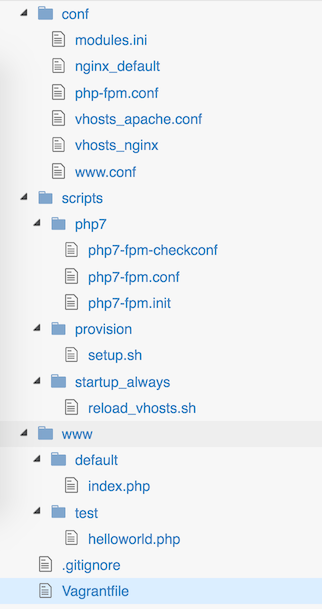
- conf : Configuration
- modules.ini : PHP module configuration
- nginx_default : Nginx default host
- php-fpm.conf : PHP7-FPM configuration
- vhosts_apache.conf : Apache virtualhosts (if you use Apache)
- vhosts_nginx : Nginx virtualhosts
- www.conf : PHP7-FPM worker configuration
- scripts : provision scripts
- www : Web root
- default : document root of default host
192.168.67.101 - test : document root of test host
test.dev
- default : document root of default host
- .gitignore : gitignore file
- Vagrantfile : Vagrantfile of PHPBox
Create a new virtualhost
- Duplicate a
serversection invhosts_nginxorVirtualHostinvhosts_apache.conf - Edit the server name and document root
- Pointing servername to PHPBox IP via
hostsfile - Restart web server
sudo service nginx restartorsudo service apache2 restart
Utils
Composer, Git, Docker is ready
This box included helpful tools like composer, git, docker, redis-server, htop, vim, screen and zsh.
PHPMyAdmin or Adminer
- Adminer (default) :
http://192.168.67.101/adminer - PHPMyAdmin :
http://192.168.67.101/phpmyadmin
Services
- MySQL user :
root/passwd - Redis :
localhost:6379
Installation config
You can open the scripts/provision/setup.sh to modify some variables to modify some packages.
Ref
- Cover image PHP7 : Yet to Release PHP 7 Expected Features and Advantages
Enjoyed this post?
If you found this helpful, consider sharing it or leaving a kudo!
0 kudos